 BUFFR: Retrospective Audio and MIDI Recorder Plugin
Never miss happy accidents again.
Keep up to two hours of audio and MIDI ready to recover—even when you never pressed Record. Capture your DAW or desktop, find the moment, and drag it into your project.
Launch priceEnds Sep 22 at 17:00 UTC



See BUFFR in action
Find the moment worth keeping. Bring it back into your project.
Retrospective audio and MIDI recording features
Always listening
- Go back through up to two hours of audio and MIDI to find the take you want.
- Silent channels use less memory. Local recovery saves help restore your session after a crash.
- Choose continuous capture, capture when sound starts, or manual recording.
Smart Quantize
- Blend Raw, Human, and Precision timing for a whole take, a marked passage, or a selection.
- Tighten chords, rolls, swing, and tuplets while keeping the feel of your performance.
- See the detected grid and how far each phrase falls ahead of or behind it.
Center Align and Ride
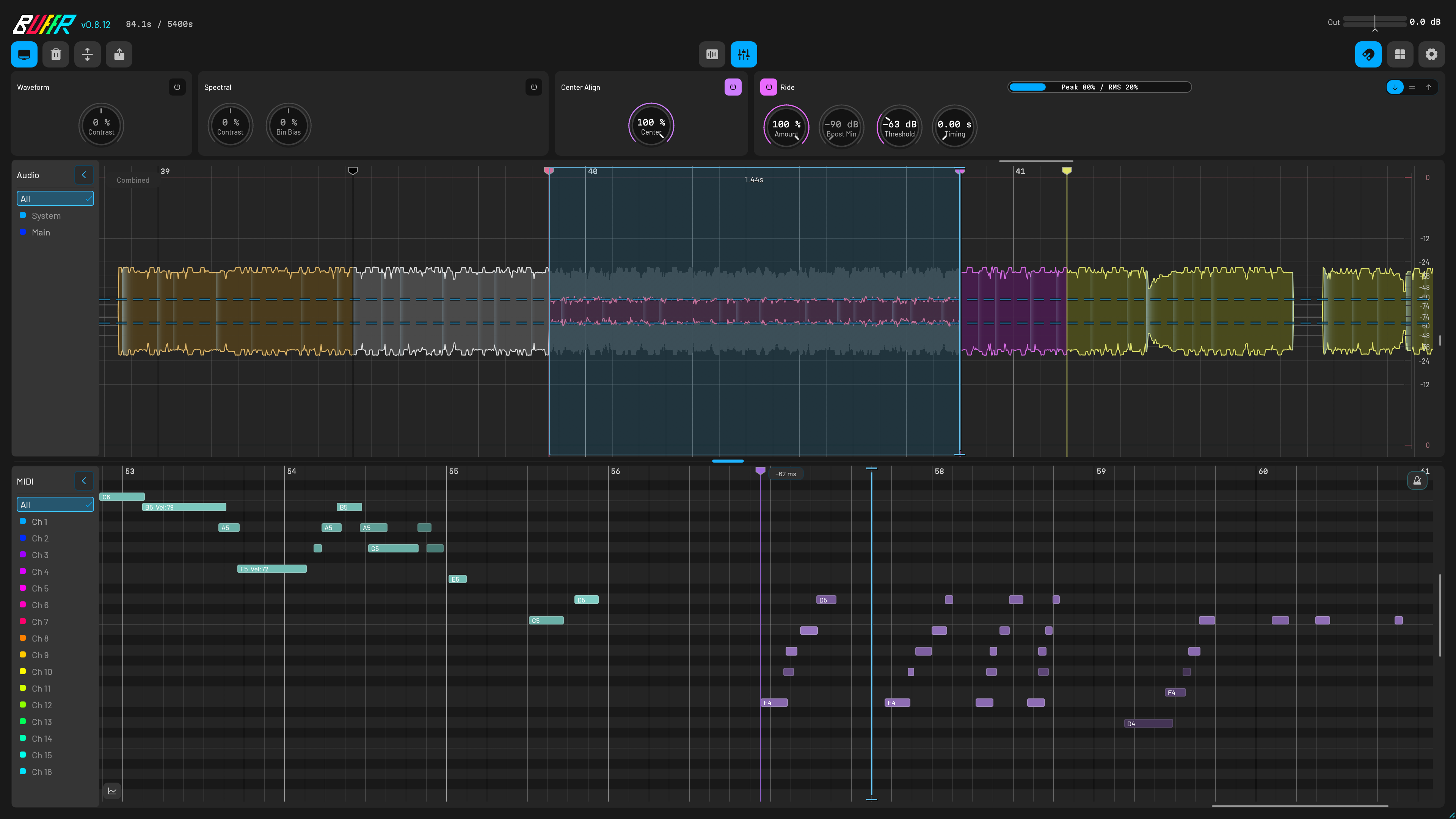
- Balance uneven waveform peaks with Center Align, then smooth the level with Ride.
- Set Ride’s response from instant to five seconds and see its gain adjustments on the waveform.
- Preview the processed audio, normalize it, and carry the same result into your drag-out or export.
Spectrogram
- GPU-accelerated analysis draws the frequencies in your recording, from the full take down to fine spectral detail, with a CPU fallback where no GPU is available.
- Wavelet synchrosqueezing sharpens the picture so notes a semitone apart stay separate instead of smearing into one ridge.
- Alt-drag across time and frequency to select a sound with Spectral Grab. Preview it, then drag it into your DAW.
- Paint along a partial and BUFFR snaps the stroke to the ridge under your pointer and writes the notes you traced.
Audio to MIDI
- A neural model transcribes a selection or the whole buffer, with no length limit, while you keep working.
- Note sensitivity, split sensitivity, and minimum length re-decode the same analysis live; detected notes light up green on the spectrogram and fill the MIDI lane as you move the sliders.
- Kick, snare, and closed hi-hat land on General MIDI drum channel 10, drawn as triangles in the MIDI lane.
- Detected notes get their own row, kept apart from channels 1-16, so a conversion never collides with what you recorded. Add commits them, or drag them straight into your DAW.
System Audio
- Capture desktop sound on a separate stereo lane without a loopback plugin. macOS requires capture permission.
- Record your main input and up to seven stereo Aux inputs in the same instance.
- Use Capture Sources to check which inputs are connected and receiving signal.
MIDI
- Capture all 16 MIDI channels from your DAW, a connected controller, or both.
- Global MIDI captures your controller directly, even with BUFFR on the master track.
- Keep notes, controller messages, pitch bend, and MPE expression. Standard MIDI File export converts richer data to what the format supports.
Drag out
- Select audio, MIDI, or a Spectral Grab and drag it straight into your DAW.
- Export audio as 24-bit FLAC, or choose WAV in Settings. MIDI exports as a Standard MIDI File.
- If your DAW does not accept a drop, use Export to save a file and import it.
Snap and markers
- See chords, note velocities, swing, and transients as you review a performance.
- Snap to the grid, transients, zero crossings, markers, or MIDI. Hold Shift to select freely.
- Press B or send MIDI CC 20 to mark a moment. Name, move, and organize markers by lane.
Controls
- Right-click Export, Waveform, Spectral, or Grid to adjust the settings for that view or action.
- Navigate with keyboard controls, visible focus, and screen-reader support.
- Choose your theme and MIDI colors, or keep BUFFR’s window on top while you work.
Testimonials
Press impression“I think Matari Audio is onto something here, and my first impressions are great.”
Translated press impression“A useful plugin for creators who want to preserve unexpected ideas and great performances.”
“思いがけないアイデアや名演を残したいクリエイターにとって便利なプラグインです。”
Translated user reaction“I tried it and was impressed. BUFFR captures the output wherever it is inserted, and MIDI is easy to understand on the same timeline.”
“試して感動。BUFFR ではどこに挿しても出音をキャプチャーできる。MIDI も同一のタイムラインで表示されて分かり易い。”
Q&A
How does the 28-day trial work?
Install BUFFR to start a one-time, 28-day trial on that computer. To keep using it after the trial, buy a perpetual license. Your license covers up to three computers and includes updates through version 1.x.
What happens if BUFFR or my DAW crashes?
BUFFR saves recovery data locally as you work. After a crash, reopen it to review the recovered audio, MIDI, and markers. The last few seconds may be missing. You decide whether to send a support report.
How do I get help with a crash or broken session?
Choose Report a problem in BUFFR or email support@matari-audio.com. Include your operating system, DAW, plugin format, BUFFR version, and the steps that led to the problem. Never send your license key.
Can I get a refund?
Yes. Email support@matari-audio.com within 14 days of purchase with your order email and order reference.
Which systems and plug-in formats are supported?
CLAP and VST3 run on macOS, Windows, and Linux. The signed Mac installer also includes AUv2 for Logic. Every platform includes a standalone app.
Does my recorded audio leave the computer?
No. Capture, editing, recovery, and export stay local. Matari only receives data you deliberately send, such as a support report.
Does BUFFR need an internet connection?
Only when a computer joins or leaves your license, and both are online today. Between those, BUFFR runs offline indefinitely: the perpetual license does not expire and there is no check-in, heartbeat, or offline time limit. It otherwise reaches the internet only to check for updates or to send a support report at your request.
What can BUFFR recover?
While loaded and capturing, BUFFR keeps up to two hours of history: up to 16 DAW audio channels, all 16 MIDI channels, and a separate System Audio lane. It cannot recover audio or MIDI from before capture started.
Is this Buffr Glitch, a buffer pedal, or the jewelry brand?
No. BUFFR is Matari Audio’s retrospective audio and MIDI recorder plugin for DAWs. It is not Robbert van der Helm’s Buffr Glitch, a guitar buffer, or the Buffr ring protector.
Loading builds…
Compare recorders
| Capability | BUFFRMatari Audio | RewindMonkeyC Audio | Rolling SamplerBird's Things | MIDI CapBird's Things | MucapOpen-source project | Fine Classics CaptureFine Classics Plugins | System Audio BridgeBird's Things | AudioRouteAudioRoute |
|---|---|---|---|---|---|---|---|---|
| Sources captured togetherWhat one running instance can keep at the same time. | Available. DAW audio + System + MIDISeparate audio groups plus DAW or direct-device MIDI | Limited. DAW audio + MIDIBuilt-in System mode is standalone-only, not a source in the normal plug-in | Limited. Audio onlyThe signal reaching the plug-in | Limited. MIDI only | Limited. MIDI only | Limited. Audio onlyWaveform retrospective recorder | Unavailable. No historyLive System Audio input for normal DAW recording | Unavailable. No historyLive route or deliberate WAV recording |
| DAW audioAudio history kept by one plug-in instance. | Available. Up to 16 DAW slotsStereo Main plus seven host-routed stereo Aux pairs | Available. Insertion-point mixStandalone inputs are merged into one export track; the plug-in records its routed channel/master | Available. One audio streamAudio reaching the plug-in | Unavailable. NoneCLAP audio passes through but is not retrospectively recorded | Unavailable. None | Available. One audio streamWaveform selection exports to WAV | Unavailable. System stream onlyNot a DAW-history recorder | Unavailable. System stream onlyNot a DAW-history recorder |
| MIDI captureNotes and controller data captured after you play. | Available. 16 channels + MPE/UMPDAW or direct device; rich events retained in the buffer | Limited. MIDI + CC/MPEVendor warns Ableton drag-in can lose MPE and Bitwig can truncate CC | Unavailable. NoneAudio-only recorder | Limited. MIDI + CCMultichannel; vendor says MPE support is unfinished | Limited. Basic MIDIAll channels; MPE is theoretical and untested | Unavailable. NoneThe product and manual describe audio-to-WAV capture | Unavailable. None | Unavailable. None |
| Direct MIDI inputCan it open a MIDI device without arming its DAW track? | Available. Built inSystem device opens linked OS inputs; matching DAW/device duplicates collapse automatically | Limited. Direct device or DAW inputThe manual makes them mutually exclusive; Windows sharing can require its SharedMIDI extension and a cloned DAW port | Unavailable. NoneNo MIDI capture | Unavailable. No direct-device modeVendor’s typical setup is a record-armed, always-monitored MIDI track | Unavailable. No direct-device plug-in modePlug-in needs a MIDI-receiving track; standalone needs JACK routing | Unavailable. NoneNo MIDI capture | Unavailable. None | Unavailable. None |
| System Audio captureCan it capture desktop output, and where? | Available. Built inSeparate stereo lane; no third-party cable or bridge. macOS 13+ grants permission to the bundled helper | Limited. Standalone onlyExternal/System switch clears current memory; macOS reroutes output, Windows selects an app | Limited. Not in stable plug-inStable uses loopback/System Audio Bridge; 1.4 beta adds experimental Windows standalone capture | Unavailable. NoneMIDI only | Unavailable. NoneMIDI only | Unavailable. NoneRecords the audio reaching its DAW track | Available. Live Windows inputWASAPI-loopback CLAP/VST3; no retrospective buffer | Available. Live routed inputBackground daemon feeds a DAW plug-in, direct recorder, or macOS virtual input |
| Separate sourcesCan captured sources be recovered separately? | Available. Main, Aux, System stay separateIndependent groups, lanes, monitoring, and export | Unavailable. One audio trackStandalone can select many interface inputs but merges them; External/System is a destructive mode switch | Unavailable. One audio stream | Limited. MIDI channels in one file | Limited. All MIDI channels in one track | Unavailable. One waveform | Unavailable. One live stereo input | Unavailable. One live routed stream |
| Setup requiredWhat must be loaded or routed before capture. | One DAW plug-inSystem Audio is built in. Current Windows 11 shares supported MIDI devices; Linux offers Virtual Raw MIDI only after confirmed RawMIDI exclusivity | Plug-in and/or standaloneDAW capture uses an instance; System Audio needs standalone plus installed routing; always-on use needs startup/template setup | Plug-in or standaloneStable System Audio needs loopback/virtual cable; 1.4 Bridge needs plug-in + standalone + matching sample rates | Armed/monitored MIDI trackNo helper or service | MIDI track or JACK routeStandalone needs a JACK-compatible graph connection | One routed DAW plug-inCaptures the signal reaching its track | One Windows DAW plug-inPrefer ASIO and avoid feedback | Installer + background daemonEnable Output to DAW; some hosts must record track output |
| History lengthLongest duration stated by the vendor. | Available. 120 minutesSelectable 1–120; dense audio remains RAM-resident, with separate recovery checkpoints | Available. Up to 90 minutesProduct, Welcome, and settings agree; other manual sentences conflict at 30/60 | Available. Stable: 10 minutesDefault 45 seconds; 1.4 beta says increased but gives no number | Available. 60 minutesDefault 60 seconds; adjustable to one hour | Limited. No published limitCurrent source appears memory-bound; this is not a vendor guarantee | Limited. Maximum not statedHistory length is adjustable | Unavailable. NoneLive input, not retrospective | Unavailable. NoneLive routing or deliberate recording |
| MIDI / MPE exportWhat MIDI data survives export. | Available. MPE/UMP buffer + SMFMPE, note expression, UMP, and raw events stay in the buffer; SMF export down-converts richer data and writes a .buffr-midi companion | Limited. MPE + CC with destination warningsVendor reports lost MPE in Ableton and truncated CC in Bitwig drag-in | Unavailable. No MIDI | Limited. CC + multichannelMPE explicitly unfinished/not guaranteed | Limited. Basic MIDIMPE theoretical and untested | Unavailable. No MIDI | Unavailable. No MIDI | Unavailable. No MIDI |
| Spectral GrabCan you select by time and frequency before export? | Available. Spectral GrabAlt-drag, audition, then export with FFT, minimum-phase, or linear-phase reconstruction | Unavailable. No spectral workflowTime/waveform selection | Unavailable. No spectral workflowTime/waveform selection | Unavailable. Not applicable | Unavailable. Not applicable | Unavailable. No spectral workflowTime/waveform selection | Unavailable. NoneLive routing only | Unavailable. NoneLive routing/recording only |
| Crash recoveryCan unsaved history return after the host crashes? | Available. Five-second checkpointsSaved instance identity restores audio, MIDI, and markers; an abrupt tail may be lost | Unavailable. RAM cache with loss warningsClosing standalone or changing source/length can clear memory; no checkpoint-restore workflow in its manual | Unavailable. RAM loop onlyFiles are created on drag; no restore workflow in stable manual | Unavailable. No restore workflowManual describes the live plug-in buffer and drag-out | Unavailable. No restore workflowCurrent source keeps instance-memory event vectors | Unavailable. No restore workflowManual describes waveform selection and WAV export | Unavailable. Not applicableNo history buffer | Unavailable. Not applicableNormal DAW/direct recording owns the file |
| Platforms and formatsCurrent operating systems and plug-in formats. | Available. macOS · Windows · LinuxCLAP, VST3, and standalone everywhere; AUv2 on macOS | Limited. macOS · WindowsVST3, AU, AAX, standalone | Available. macOS · Windows · LinuxCLAP, VST3, AU, standalone; format varies by OS | Limited. macOS · WindowsCLAP, VST3, AU; format varies by OS | Limited. LinuxCLAP, VST3, standalone | Limited. macOS · WindowsVST3, AU, AAX; format varies by OS | Limited. WindowsCLAP, VST3 | Limited. macOS · WindowsVST3/AU path varies; Windows virtual input still pending |
| ExportHow captured material leaves the tool. | Available. Audio + MIDI file dragDAW, another BUFFR, accepting app, or file manager; open protocol | Available. Audio + MIDI drag/saveSmart Drag placement guidance in the plug-in | Limited. Audio drag/saveVendor warns some Linux/DAW drag combinations fail | Available. MIDI-file drag | Limited. Generate + clipboard/pasteNot a documented drag gesture | Available. WAV dragTo DAW or browser | Available. Record normally in DAWNo retrospective selection | Available. DAW recording or direct WAVNo retrospective selection |
| Linux drag-outWhether file drag works on Linux desktops. | Available. Wayland/XWayland dragMatari-tested on Hyprland, niri, KDE Plasma, GNOME, and Xfce; Void and NixOS also tested | Unavailable. No Linux build | Limited. Vendor warns drag can failSome Linux distribution/DAW combinations | Unavailable. No Linux build | Unavailable. Clipboard/pasteNo documented drag source | Unavailable. No Linux build | Unavailable. Windows only | Unavailable. No Linux build |
Matari makes BUFFR. Other cells come from first-party vendor material, reviewed August 15, 2026. Product names identify the compared tools; no affiliation or endorsement is implied. Missing docs are not treated as a feature.