
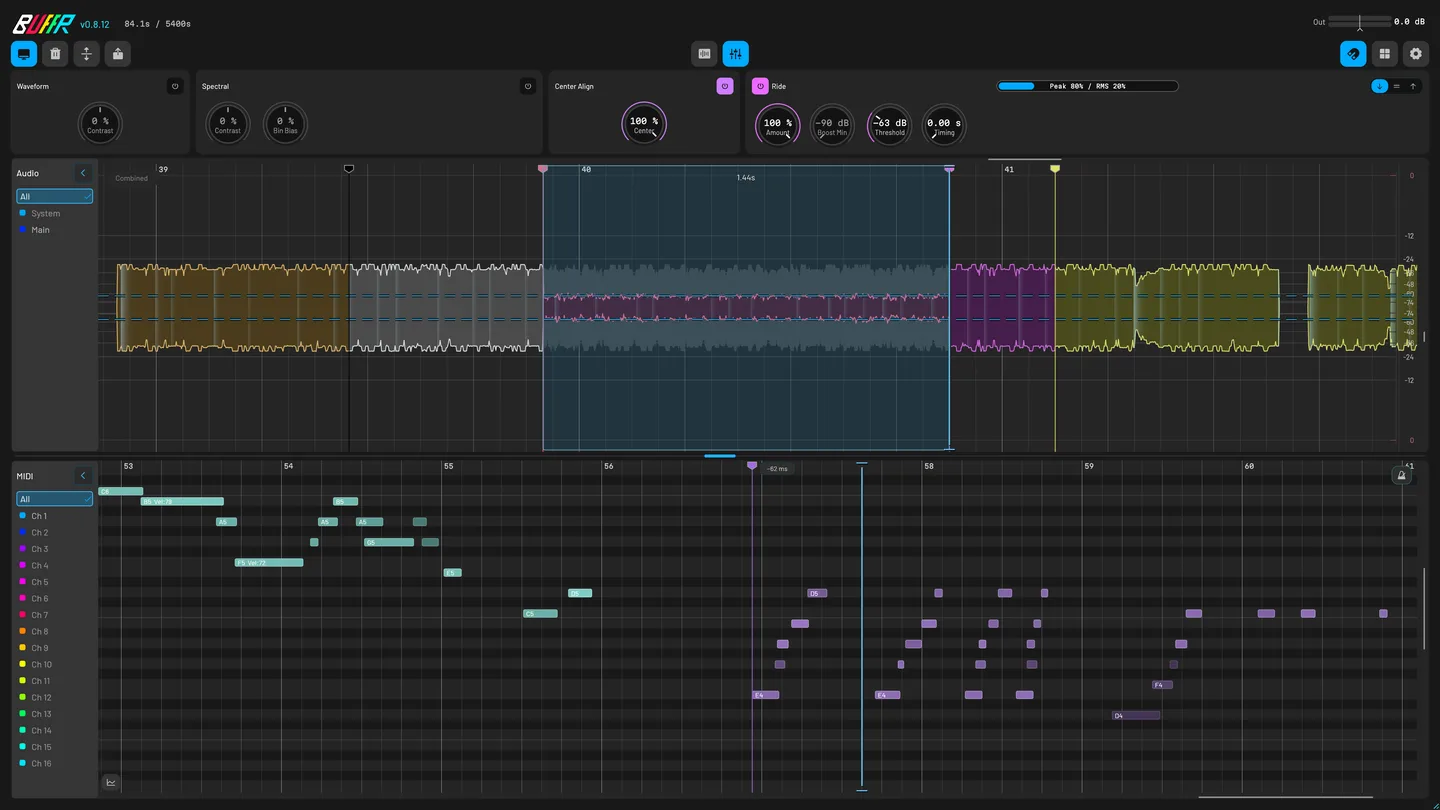
BUFFR captures your master mix, controller MIDI and System Audio before you press Record. Select a range and drag it into your project.
Buy — $69$89 · Through Dec 31 · UTC

Click a feature to try it in BUFFR.
Capture
- Continuous audio and MIDI capture before Record.
- Capture 16 MIDI channels, CC, pitch bend and MPE directly from controllers.
- Record computer playback on a separate stereo lane.
- Hot-plug controllers. Follow incoming phrases and pitch range.
- Capture up to 16 DAW audio channels with separate lanes, monitoring and playback.
- Inspect Main, Aux and System Audio separately.
- See which audio and MIDI inputs are connected and receiving signal.
- Retain up to two hours of audio and MIDI.
- Silent channel data uses less memory while the timeline keeps its timing.
- Choose continuous capture, capture when sound starts, or record manually.
Export
- Select the moment and bring its audio and MIDI back into your DAW.
- Press B or send MIDI CC 20. Name, colour, move and link markers to a lane.
- Reopen the same project and instance to restore the last complete audio, MIDI and marker checkpoint.
- Keep the selected channel layout or fold it to mono without changing the original.
- Listen to disk-backed history without loading the whole recording into memory.
- Follow playback or seek to any frame.
- Drag audio as 24-bit FLAC, choose WAV in Settings, or export a Standard MIDI File.
Edit
- Audition processing on captured audio, with undo and redo.
- Use the grid, transients, zero crossings, markers or MIDI to place a selection.
- Blend Raw, Human and Precision timing. Tighten chords, swing and tuplets while keeping the feel.
- Switch between Raw, With FX and phase renders from one audition transport.
- Balance uneven positive and negative waveform peaks. Preview the result without changing the original.
- Smooth the level with Peak-to-RMS detection and 0–5 second response. See the gain curve on the waveform.
- Normalize processed audio and carry the same result into your export.
Spectral
- Select time and frequencies. Preview, extract or remove the sound you want.
- Keep detailed analysis through zoom changes, view changes and recovered sessions.
- Transcribe a selection, the whole buffer or a Spectral Grab into melody and drum MIDI. Adjust detection live.
- Explore fine frequency detail, even on a system without GPU analysis.
- Wavelet analysis sharpens nearby notes so they do not blur into one ridge.
- Trace a partial in the spectrogram. BUFFR follows its ridge and writes the notes into MIDI.
- Transcribed notes use their own row. Kick, snare and closed hi-hat use General MIDI channel 10.
Workflow
- See new releases and review diagnostics before sending a problem report.
- Right-click Export, Waveform, Spectral or Grid for the relevant settings.
- Review locally saved crash evidence and choose whether to send it.
- Inspect velocities, sounding notes, MPE and CLAP note expression.
- Navigate with keyboard controls, visible focus and screen-reader support.
- Change themes, MIDI colours and window behaviour.
- Capture, edit and export offline. A perpetual license has no ongoing check-in requirement.
How BUFFR compares
114 rows · 10 products
Available: supported. Partial: part of the workflow works. Upcoming: planned, not shipped. Unavailable: a stated limit. Not confirmed: the source does not answer.
| Feature or detail | BUFFRMatari Audio | Polarity RecorderPolarity Music | Siftportalsurfer | RewindMonkeyC Audio | Rolling SamplerBird's Things | MIDI CapBird's Things | MucapOpen-source project | Fine Classics CaptureFine Classics Plugins | System Audio BridgeBird's Things | AudioRouteAudioRoute |
|---|---|---|---|---|---|---|---|---|---|---|
| Sources captured togetherWhat one running instance can keep at the same time. | AvailableDAW audio + System + MIDISeparate audio groups plus DAW or direct-device MIDI | PartialAudio onlyDesktop capture uses the standalone app | PartialAudio recording + importThe listing does not state an always-on history mode | PartialDAW audio + MIDIBuilt-in System mode is standalone-only, not a source in the normal plug-in | PartialAudio onlyThe signal reaching the plug-in | PartialMIDI only | PartialMIDI only | PartialAudio onlyWaveform retrospective recorder | UnavailableNo historyLive System Audio input for normal DAW recording | UnavailableNo historyLive route or deliberate WAV recording |
| DAW audioAudio history kept by one plug-in instance. | AvailableUp to 16 DAW slotsStereo Main plus seven host-routed stereo Aux pairs | AvailableMono or stereoAudio at the plug-in input | AvailableRecords audioChannel count is not stated | AvailableInsertion-point mixStandalone inputs are merged into one export track; the plug-in records its routed channel/master | AvailableOne audio streamAudio reaching the plug-in | UnavailableNoneCLAP audio passes through but is not retrospectively recorded | UnavailableNone | AvailableOne audio streamWaveform selection exports to WAV | UnavailableSystem stream onlyNot a DAW-history recorder | UnavailableSystem stream onlyNot a DAW-history recorder |
| MIDI captureNotes and controller data captured after you play. | Available16 channels + expressionDAW or direct controller input; MPE and MIDI 2.0 events stay in the buffer | UnavailableNoneAudio recorder | Not confirmedNot documentedThe listing describes audio | PartialMIDI + CC/MPEVendor warns Ableton drag-in can lose MPE and Bitwig can truncate CC | UnavailableNoneAudio-only recorder | PartialMIDI + CCMultichannel; vendor says MPE support is unfinished | PartialBasic MIDIAll channels; MPE is theoretical and untested | UnavailableNoneThe product and manual describe audio-to-WAV capture | UnavailableNone | UnavailableNone |
| Direct MIDI inputCan it open a MIDI device without arming its DAW track? | AvailableBuilt inSystem device opens linked OS inputs; matching DAW/device duplicates collapse automatically | UnavailableNoneNo MIDI capture | Not confirmedNot documented | PartialDirect device or DAW inputThe manual makes them mutually exclusive; Windows sharing can require its SharedMIDI extension and a cloned DAW port | UnavailableNoneNo MIDI capture | UnavailableNo direct-device modeVendor’s typical setup is a record-armed, always-monitored MIDI track | UnavailableNo direct-device plug-in modePlug-in needs a MIDI-receiving track; standalone needs JACK routing | UnavailableNoneNo MIDI capture | UnavailableNone | UnavailableNone |
| System Audio captureCan it capture desktop output, and where? | AvailableBuilt inSeparate stereo lane; no third-party cable or bridge. macOS 13+ grants permission to the bundled helper | PartialStandalone onlyDesktop capture on Windows, macOS and Linux | Not confirmedNot documented | PartialStandalone onlyExternal/System switch clears current memory; macOS reroutes output, Windows selects an app | PartialNot in stable plug-inStable uses loopback/System Audio Bridge; 1.4 beta adds experimental Windows standalone capture | UnavailableNoneMIDI only | UnavailableNoneMIDI only | UnavailableNoneRecords the audio reaching its DAW track | AvailableLive Windows inputWASAPI-loopback CLAP/VST3; no retrospective buffer | AvailableLive routed inputBackground daemon feeds a DAW plug-in, direct recorder, or macOS virtual input |
| Separate sourcesCan captured sources be recovered separately? | AvailableMain, Aux, System stay separateIndependent groups, lanes, monitoring, and export | PartialOne audio inputPlug-in input or standalone desktop/interface source | Not confirmedNot documented | UnavailableOne audio trackStandalone can select many interface inputs but merges them; External/System is a destructive mode switch | UnavailableOne audio stream | PartialMIDI channels in one file | PartialAll MIDI channels in one track | UnavailableOne waveform | UnavailableOne live stereo input | UnavailableOne live routed stream |
| Setup requiredWhat must be loaded or routed before capture. | One DAW plug-inSystem Audio is built in. Current Windows 11 shares supported MIDI devices; Linux offers Virtual Raw MIDI only after confirmed RawMIDI exclusivity | Plug-in or standaloneDesktop sound needs the standalone app | VST3 plug-inVerified account registration is required | Plug-in and/or standaloneDAW capture uses an instance; System Audio needs standalone plus installed routing; always-on use needs startup/template setup | Plug-in or standaloneStable System Audio needs loopback/virtual cable; 1.4 Bridge needs plug-in + standalone + matching sample rates | Armed/monitored MIDI trackNo helper or service | MIDI track or JACK routeStandalone needs a JACK-compatible graph connection | One routed DAW plug-inCaptures the signal reaching its track | One Windows DAW plug-inPrefer ASIO and avoid feedback | Installer + background daemonEnable Output to DAW; some hosts must record track output |
| History lengthLongest duration stated by the vendor. | 120 minutesSelectable 1–120; silent channels use less memory; local checkpoints support recovery | 20 minutesChoose 1, 2, 5, 10 or 20 minutes | Not statedNo rolling-history limit in the listing | Up to 90 minutesProduct, Welcome, and settings agree; other manual sentences conflict at 30/60 | Stable: 10 minutesDefault 45 seconds; 1.4 beta says increased but gives no number | 60 minutesDefault 60 seconds; adjustable to one hour | No published limitCurrent source appears memory-bound; this is not a vendor guarantee | Maximum not statedHistory length is adjustable | NoneLive input, not retrospective | NoneLive routing or deliberate recording |
| MIDI / MPE exportWhat MIDI data survives export. | PartialMPE/UMP buffer + SMFMPE, note expression, UMP, and raw events stay in the buffer; SMF export down-converts richer data and writes a .buffr-midi companion | UnavailableNo MIDI | Not confirmedNot documented | PartialMPE + CC with destination warningsVendor reports lost MPE in Ableton and truncated CC in Bitwig drag-in | UnavailableNo MIDI | PartialCC + multichannelMPE explicitly unfinished/not guaranteed | PartialBasic MIDIMPE theoretical and untested | UnavailableNo MIDI | UnavailableNo MIDI | UnavailableNo MIDI |
| Spectral GrabCan you select by time and frequency before export? | AvailableSpectral GrabAlt-drag, audition, then export with FFT, minimum-phase, or linear-phase reconstruction | UnavailableFrequency colorsColors show frequency ranges; no frequency extraction tool is listed | Not confirmedNot documented | Not confirmedNo spectral workflowTime/waveform selection | Not confirmedNo spectral workflowTime/waveform selection | UnavailableNot applicable | UnavailableNot applicable | Not confirmedNo spectral workflowTime/waveform selection | UnavailableNoneLive routing only | UnavailableNoneLive routing/recording only |
| Crash recoveryCan unsaved history return after the host crashes? | AvailableFive-second checkpointsSaved instance identity restores audio, MIDI, and markers; an abrupt tail may be lost | UnavailableNo checkpoint restore listedThe DAW project does not contain the recorded audio | Not confirmedNot documented | Not confirmedRAM cache with loss warningsClosing standalone or changing source/length can clear memory; no checkpoint-restore workflow in its manual | UnavailableRAM loop onlyFiles are created on drag; no restore workflow in stable manual | Not confirmedNo restore workflowManual describes the live plug-in buffer and drag-out | Not confirmedNo restore workflowCurrent source keeps instance-memory event vectors | Not confirmedNo restore workflowManual describes waveform selection and WAV export | UnavailableNot applicableNo history buffer | UnavailableNot applicableNormal DAW/direct recording owns the file |
| Platforms and formatsCurrent operating systems and plug-in formats. | macOS · Windows · LinuxCLAP, VST3, and standalone everywhere; AUv2 on macOS | macOS · Windows · LinuxCLAP, VST3, LV2, standalone; AUv2 on macOS | macOS · WindowsVST3: Apple silicon and Windows x64; no Linux build listed | macOS · WindowsVST3, AU, AAX, standalone | macOS · Windows · LinuxCLAP, VST3, AU, standalone; format varies by OS | macOS · WindowsCLAP, VST3, AU; format varies by OS | LinuxCLAP, VST3, standalone | macOS · WindowsVST3, AU, AAX; format varies by OS | WindowsCLAP, VST3 | macOS · WindowsVST3/AU path varies; Windows virtual input still pending |
| ExportHow captured material leaves the tool. | Audio + MIDI file dragDAW, another BUFFR, accepting app, or file manager; open protocol | WAV drag or SaveNative drag on Windows/macOS; Save on Linux | Audio drag + local samplesAudio import and selection preview are also listed | Audio + MIDI drag/saveSmart Drag placement guidance in the plug-in | Audio drag/saveVendor warns some Linux/DAW drag combinations fail | MIDI-file drag | Generate + clipboard/pasteNot a documented drag gesture | WAV dragTo DAW or browser | Record normally in DAWNo retrospective selection | DAW recording or direct WAVNo retrospective selection |
| Linux drag-outWhether file drag works on Linux desktops. | AvailableWayland/XWayland dragMatari-tested on Hyprland, niri, KDE Plasma, GNOME, and Xfce; Void and NixOS also tested | UnavailableSave onlyNative file drag is not available on Linux | UnavailableNo Linux build listed | UnavailableNo Linux build | PartialVendor warns drag can failSome Linux distribution/DAW combinations | UnavailableNo Linux build | UnavailableClipboard/pasteNo documented drag source | UnavailableNo Linux build | UnavailableWindows only | UnavailableNo Linux build |
| Turn audio into MIDICan it turn a recording into editable notes? | AvailableMelody + drum notesTranscribe captured audio or a frequency selection; detected notes stay on their own row | Not confirmedNot documented | Not confirmedNot documented | Not confirmedNot documented | Not confirmedNot documented | Not confirmedNot documented | Not confirmedNot documented | Not confirmedNot documented | Not confirmedNot documented | Not confirmedNot documented |
| Edit before exportWhat can you change before a clip leaves the recorder? | Timing, level, phase + frequenciesSmart Quantize, Ride, Center Align, Spectral Grab and audio-to-MIDI | Waveform + loop editorClipboard edits, fades, gain, reverse, rotate/wrap, peak/LUFS normalization and undo/redo | Selection preview + extractionThe listing also describes audio import; detailed editing tools are not stated | Waveform selectionSee its manual for the full editing workflow | Selection + previewSelect, audition and drag audio from the history | MIDI selectionZoomable multichannel display | MIDI file generationCopy a temporary MIDI file reference to the clipboard | Waveform selectionSelect captured audio and drag a WAV file | Edit in your DAWLive audio input, not a clip editor | Edit in your DAWLive routing and recording, not a retrospective editor |
| Offline useDoes the paid license need repeated online checks? | AvailableUnlimited offline useOnline only when a computer joins or leaves the license; up to three computers | AvailableFree, no account | Partial40 days offlineAn online license check renews access | AvailableOffline iLok | AvailableOffline activation | AvailableNo copy protection | AvailableOpen source | Not confirmedNot documented | Not confirmedNot documented | Not confirmedNot documented |
| Always-on captureContinuous audio and MIDI capture before Record. | AvailableContinuous audio and MIDI capture before Record. | AvailableAudio | Not confirmed | AvailableAudio + MIDI | AvailableAudio | AvailableMIDI | AvailableMIDI | AvailableAudio | UnavailableLive input only | UnavailableLive routing only |
| Direct controller MIDI + MPECapture 16 MIDI channels, CC, pitch bend and MPE directly from controllers. | AvailableCapture 16 MIDI channels, CC, pitch bend and MPE directly from controllers. | UnavailableAudio only | Not confirmed | PartialDevice or DAW inputDestination MPE/CC limits | UnavailableAudio only | PartialDAW MIDIMPE unfinished | PartialBasic MIDIMPE untested | UnavailableAudio only | Not confirmed | Not confirmed |
| System Audio captureRecord computer playback on a separate stereo lane. | AvailableRecord computer playback on a separate stereo lane. | PartialStandalone onlyDesktop capture on Windows, macOS and Linux | Not confirmedNot documented | PartialStandalone onlyExternal/System switch clears current memory; macOS reroutes output, Windows selects an app | PartialNot in stable plug-inStable uses loopback/System Audio Bridge; 1.4 beta adds experimental Windows standalone capture | UnavailableNoneMIDI only | UnavailableNoneMIDI only | UnavailableNoneRecords the audio reaching its DAW track | AvailableLive Windows inputWASAPI-loopback CLAP/VST3; no retrospective buffer | AvailableLive routed inputBackground daemon feeds a DAW plug-in, direct recorder, or macOS virtual input |
| Controller hot-plug and MIDI followHot-plug controllers. Follow incoming phrases and pitch range. | AvailableHot-plug controllers. Follow incoming phrases and pitch range. | UnavailableAudio only | Not confirmed | Not confirmed | UnavailableAudio only | Not confirmed | Not confirmed | UnavailableAudio only | Not confirmed | Not confirmed |
| Main + seven stereo Aux inputsCapture up to 16 DAW audio channels with separate lanes, monitoring and playback. | AvailableCapture up to 16 DAW audio channels with separate lanes, monitoring and playback. | UnavailableMono or stereo | Not confirmed | PartialMerged audioMultiple standalone inputs become one export track | Not confirmed | Not confirmed | Not confirmed | Not confirmed | Not confirmed | Not confirmed |
| Independent source timelinesInspect Main, Aux and System Audio separately. | AvailableInspect Main, Aux and System Audio separately. | UnavailableOne audio source | Not confirmed | PartialMerged audio | UnavailableOne audio stream | Not confirmed | Not confirmed | UnavailableOne waveform | Not confirmed | Not confirmed |
| Capture SourcesSee which audio and MIDI inputs are connected and receiving signal. | AvailableSee which audio and MIDI inputs are connected and receiving signal. | PartialStandalone source menu | Not confirmed | PartialStandalone sources | Not confirmed | Not confirmed | Not confirmed | Not confirmed | Not confirmed | Not confirmed |
| Up to two hours of historyRetain up to two hours of audio and MIDI. | AvailableRetain up to two hours of audio and MIDI. | Unavailable20 minutes maximum | Not confirmed | Unavailable90 minutes maximum | Unavailable10 minutes in stable | Unavailable60 minutes maximum | Not confirmed | Not confirmed | Not confirmed | Not confirmed |
| Less memory for silent channelsSilent channel data uses less memory while the timeline keeps its timing. | AvailableSilent channel data uses less memory while the timeline keeps its timing. | Not confirmed | Not confirmed | Not confirmed | Not confirmed | Not confirmed | Not confirmed | Not confirmed | Not confirmed | Not confirmed |
| Always, On Sound or ManualChoose continuous capture, capture when sound starts, or record manually. | AvailableChoose continuous capture, capture when sound starts, or record manually. | Not confirmed | Not confirmed | Not confirmed | Not confirmed | Not confirmed | Not confirmed | Not confirmed | Not confirmed | Not confirmed |
| Linked audio and MIDI drag-outSelect the moment and bring its audio and MIDI back into your DAW. | AvailableSelect the moment and bring its audio and MIDI back into your DAW. | PartialAudio onlySave on Linux | PartialAudio only listed | AvailableAudio + MIDI | PartialAudio onlyLinux drag can fail | PartialMIDI only | PartialMIDI clipboard/paste | PartialWAV only | Not confirmed | Not confirmed |
| Jam markersPress B or send MIDI CC 20. Name, colour, move and link markers to a lane. | AvailablePress B or send MIDI CC 20. Name, colour, move and link markers to a lane. | Not confirmed | Not confirmed | Not confirmed | Not confirmed | Not confirmed | Not confirmed | Not confirmed | Not confirmed | Not confirmed |
| Local recovery checkpointsReopen the same project and instance to restore the last complete audio, MIDI and marker checkpoint. | AvailableReopen the same project and instance to restore the last complete audio, MIDI and marker checkpoint. | Not confirmed | Not confirmed | Not confirmed | Not confirmed | Not confirmed | Not confirmed | Not confirmed | Not confirmed | Not confirmed |
| Multichannel or mono exportKeep the selected channel layout or fold it to mono without changing the original. | AvailableKeep the selected channel layout or fold it to mono without changing the original. | PartialMono or stereo | Not confirmed | PartialOne merged audio track | Not confirmed | Not confirmed | Not confirmed | Not confirmed | Not confirmed | Not confirmed |
| Preview long recordingsListen to disk-backed history without loading the whole recording into memory. | AvailableListen to disk-backed history without loading the whole recording into memory. | Not confirmed | Not confirmed | Not confirmed | Not confirmed | Not confirmed | Not confirmed | Not confirmed | Not confirmed | Not confirmed |
| Playback follow and seekFollow playback or seek to any frame. | AvailableFollow playback or seek to any frame. | Not confirmed | Not confirmed | Not confirmed | Not confirmed | Not confirmed | Not confirmed | Not confirmed | Not confirmed | Not confirmed |
| FLAC, WAV and MIDI filesDrag audio as 24-bit FLAC, choose WAV in Settings, or export a Standard MIDI File. | AvailableDrag audio as 24-bit FLAC, choose WAV in Settings, or export a Standard MIDI File. | PartialWAV only | Not confirmed | Not confirmed | Not confirmed | PartialMIDI only | PartialMIDI only | PartialWAV only | Not confirmed | Not confirmed |
| Dynamics, Spectral and Phase CorrectionAudition processing on captured audio, with undo and redo. | AvailableAudition processing on captured audio, with undo and redo. | Not confirmed | Not confirmed | Not confirmed | Not confirmed | Not confirmed | Not confirmed | Not confirmed | Not confirmed | Not confirmed |
| Snap to what mattersUse the grid, transients, zero crossings, markers or MIDI to place a selection. | AvailableUse the grid, transients, zero crossings, markers or MIDI to place a selection. | PartialBars and beatsNo transient, zero-crossing or MIDI snapping listed | Not confirmed | Not confirmed | Not confirmed | Not confirmed | Not confirmed | Not confirmed | Not confirmed | Not confirmed |
| Smart QuantizeBlend Raw, Human and Precision timing. Tighten chords, swing and tuplets while keeping the feel. | AvailableBlend Raw, Human and Precision timing. Tighten chords, swing and tuplets while keeping the feel. | Not confirmed | Not confirmed | Not confirmed | Not confirmed | Not confirmed | Not confirmed | Not confirmed | Not confirmed | Not confirmed |
| Compare original and processed audioSwitch between Raw, With FX and phase renders from one audition transport. | AvailableSwitch between Raw, With FX and phase renders from one audition transport. | Not confirmed | Not confirmed | Not confirmed | Not confirmed | Not confirmed | Not confirmed | Not confirmed | Not confirmed | Not confirmed |
| Center AlignBalance uneven positive and negative waveform peaks. Preview the result without changing the original. | AvailableBalance uneven positive and negative waveform peaks. Preview the result without changing the original. | Not confirmed | Not confirmed | Not confirmed | Not confirmed | Not confirmed | Not confirmed | Not confirmed | Not confirmed | Not confirmed |
| RideSmooth the level with Peak-to-RMS detection and 0–5 second response. See the gain curve on the waveform. | AvailableSmooth the level with Peak-to-RMS detection and 0–5 second response. See the gain curve on the waveform. | Not confirmed | Not confirmed | Not confirmed | Not confirmed | Not confirmed | Not confirmed | Not confirmed | Not confirmed | Not confirmed |
| Normalize the resultNormalize processed audio and carry the same result into your export. | AvailableNormalize processed audio and carry the same result into your export. | AvailablePeak or LUFS | Not confirmed | Not confirmed | Not confirmed | Not confirmed | Not confirmed | Not confirmed | Not confirmed | Not confirmed |
| Spectral GrabSelect time and frequencies. Preview, extract or remove the sound you want. | AvailableSelect time and frequencies. Preview, extract or remove the sound you want. | Not confirmed | Not confirmed | Not confirmed | Not confirmed | Not confirmed | Not confirmed | Not confirmed | Not confirmed | Not confirmed |
| Retained spectrogram detailKeep detailed analysis through zoom changes, view changes and recovered sessions. | AvailableKeep detailed analysis through zoom changes, view changes and recovered sessions. | Not confirmed | Not confirmed | Not confirmed | Not confirmed | Not confirmed | Not confirmed | Not confirmed | Not confirmed | Not confirmed |
| Audio to MIDITranscribe a selection, the whole buffer or a Spectral Grab into melody and drum MIDI. Adjust detection live. | AvailableTranscribe a selection, the whole buffer or a Spectral Grab into melody and drum MIDI. Adjust detection live. | Not confirmed | Not confirmed | Not confirmed | Not confirmed | Not confirmed | Not confirmed | Not confirmed | Not confirmed | Not confirmed |
| GPU spectrogram with CPU fallbackExplore fine frequency detail, even on a system without GPU analysis. | AvailableExplore fine frequency detail, even on a system without GPU analysis. | Not confirmed | Not confirmed | Not confirmed | Not confirmed | Not confirmed | Not confirmed | Not confirmed | Not confirmed | Not confirmed |
| Wavelet synchrosqueezingWavelet analysis sharpens nearby notes so they do not blur into one ridge. | AvailableWavelet analysis sharpens nearby notes so they do not blur into one ridge. | Not confirmed | Not confirmed | Not confirmed | Not confirmed | Not confirmed | Not confirmed | Not confirmed | Not confirmed | Not confirmed |
| Spectral PaintTrace a partial in the spectrogram. BUFFR follows its ridge and writes the notes into MIDI. | AvailableTrace a partial in the spectrogram. BUFFR follows its ridge and writes the notes into MIDI. | Not confirmed | Not confirmed | Not confirmed | Not confirmed | Not confirmed | Not confirmed | Not confirmed | Not confirmed | Not confirmed |
| Detected notes stay separateTranscribed notes use their own row. Kick, snare and closed hi-hat use General MIDI channel 10. | AvailableTranscribed notes use their own row. Kick, snare and closed hi-hat use General MIDI channel 10. | Not confirmed | Not confirmed | Not confirmed | Not confirmed | Not confirmed | Not confirmed | Not confirmed | Not confirmed | Not confirmed |
| Updates inside BUFFRSee new releases and review diagnostics before sending a problem report. | AvailableSee new releases and review diagnostics before sending a problem report. | Not confirmed | Not confirmed | Not confirmed | Not confirmed | Not confirmed | Not confirmed | Not confirmed | Not confirmed | Not confirmed |
| Context controlsRight-click Export, Waveform, Spectral or Grid for the relevant settings. | AvailableRight-click Export, Waveform, Spectral or Grid for the relevant settings. | Not confirmed | Not confirmed | Not confirmed | AvailableRight-click settings | Not confirmed | Not confirmed | Not confirmed | Not confirmed | Not confirmed |
| Local crash reportsReview locally saved crash evidence and choose whether to send it. | AvailableReview locally saved crash evidence and choose whether to send it. | Not confirmed | Not confirmed | Not confirmed | Not confirmed | Not confirmed | Not confirmed | Not confirmed | Not confirmed | Not confirmed |
| Visible MIDI expressionInspect velocities, sounding notes, MPE and CLAP note expression. | AvailableInspect velocities, sounding notes, MPE and CLAP note expression. | UnavailableAudio only | Not confirmed | Not confirmed | UnavailableAudio only | PartialMultichannel MIDIMPE unfinished | Not confirmed | UnavailableAudio only | Not confirmed | Not confirmed |
| Keyboard and screen-reader supportNavigate with keyboard controls, visible focus and screen-reader support. | AvailableNavigate with keyboard controls, visible focus and screen-reader support. | Not confirmed | Not confirmed | Not confirmed | Not confirmed | Not confirmed | Not confirmed | Not confirmed | Not confirmed | Not confirmed |
| Themes and always-on-topChange themes, MIDI colours and window behaviour. | AvailableChange themes, MIDI colours and window behaviour. | Not confirmed | Not confirmed | Not confirmed | Not confirmed | Not confirmed | Not confirmed | PartialCustom themesAlways-on-top is not confirmed | Not confirmed | Not confirmed |
| Offline capture and exportCapture, edit and export offline. A perpetual license has no ongoing check-in requirement. | AvailableCapture, edit and export offline. A perpetual license has no ongoing check-in requirement. | AvailableFree, no account | Partial40 days offlineAn online license check renews access | AvailableOffline iLok | AvailableOffline activation | AvailableNo copy protection | AvailableOpen source | Not confirmed | Not confirmed | Not confirmed |
| Dynamic tempo mapCapture changing tempo, meter, loops, and transport moves across the full retained history. | UpcomingNext release work; not shippedCapture changing tempo, meter, loops, and transport moves across the full retained history. | Not confirmed | Not confirmed | Not confirmed | Not confirmed | Not confirmed | Not confirmed | Not confirmed | Not confirmed | Not confirmed |
| Dynamic musical gridKeep audio and MIDI aligned to a grid that follows every tempo change instead of one fixed BPM. | UpcomingPlanned; not shippedKeep audio and MIDI aligned to a grid that follows every tempo change instead of one fixed BPM. | Not confirmed | Not confirmed | Not confirmed | Not confirmed | Not confirmed | Not confirmed | Not confirmed | Not confirmed | Not confirmed |
| Tempo change markersShow BPM steps and ramps directly on the timeline without rewriting the earlier grid. | UpcomingPlanned; not shippedShow BPM steps and ramps directly on the timeline without rewriting the earlier grid. | Not confirmed | Not confirmed | Not confirmed | Not confirmed | Not confirmed | Not confirmed | Not confirmed | Not confirmed | Not confirmed |
| Tempo-aware MIDI exportCarry the complete tempo map into dragged MIDI files so performances land correctly in the DAW. | UpcomingPlanned; not shippedCarry the complete tempo map into dragged MIDI files so performances land correctly in the DAW. | Not confirmed | Not confirmed | Not confirmed | Not confirmed | Not confirmed | Not confirmed | Not confirmed | Not confirmed | Not confirmed |
| Dynamic BPM captureDerive a changing musical grid from performances even when the host provides no tempo. | UpcomingPlanned; not shippedDerive a changing musical grid from performances even when the host provides no tempo. | Not confirmed | Not confirmed | Not confirmed | Not confirmed | Not confirmed | Not confirmed | Not confirmed | Not confirmed | Not confirmed |
| Sheet music viewSee captured MIDI as readable musical notation directly inside BUFFR. | UpcomingPlanned; not shippedSee captured MIDI as readable musical notation directly inside BUFFR. | Not confirmed | Not confirmed | Not confirmed | Not confirmed | Not confirmed | Not confirmed | Not confirmed | Not confirmed | Not confirmed |
| MusicXML exportSend captured notation to score editors for arranging, engraving, or printing. | UpcomingPlanned; not shippedSend captured notation to score editors for arranging, engraving, or printing. | Not confirmed | Not confirmed | Not confirmed | Not confirmed | Not confirmed | Not confirmed | Not confirmed | Not confirmed | Not confirmed |
| Hold recordingPublished by Polarity Recorder; compare the exact workflow and limits. | PartialManual capture modeStop automatic capture by choosing Manual | Available | Not confirmed | Not confirmed | Not confirmed | Not confirmed | Not confirmed | Not confirmed | Not confirmed | Not confirmed |
| Hold the history viewPublished by Polarity Recorder; compare the exact workflow and limits. | AvailableTurn Follow off | Available | Not confirmed | Not confirmed | Not confirmed | Not confirmed | Not confirmed | Not confirmed | Not confirmed | Not confirmed |
| Waveform frequency colorsPublished by Polarity Recorder; compare the exact workflow and limits. | PartialSpectrogram colorsFrequency detail is shown in the spectral view | Available | Not confirmed | Not confirmed | Not confirmed | Not confirmed | Not confirmed | Not confirmed | Not confirmed | Not confirmed |
| Host transport, bar and beat markersPublished by Polarity Recorder; compare the exact workflow and limits. | PartialGrid + jam markersA complete changing tempo map is not shipped | Available | Not confirmed | Not confirmed | Not confirmed | Not confirmed | Not confirmed | Not confirmed | Not confirmed | Not confirmed |
| Musical grid and manual BPMPublished by Polarity Recorder; compare the exact workflow and limits. | AvailableGrid and Snap | Available | Not confirmed | Not confirmed | Not confirmed | Not confirmed | Not confirmed | Not confirmed | Not confirmed | Not confirmed |
| Separate owned audio clip editorPublished by Polarity Recorder; compare the exact workflow and limits. | Not confirmed | Available | Not confirmed | Not confirmed | Not confirmed | Not confirmed | Not confirmed | Not confirmed | Not confirmed | Not confirmed |
| Audio copy, cut and pastePublished by Polarity Recorder; compare the exact workflow and limits. | Not confirmed | Available | Not confirmed | Not confirmed | Not confirmed | Not confirmed | Not confirmed | Not confirmed | Not confirmed | Not confirmed |
| Silence part of an audio clipPublished by Polarity Recorder; compare the exact workflow and limits. | Not confirmed | Available | Not confirmed | Not confirmed | Not confirmed | Not confirmed | Not confirmed | Not confirmed | Not confirmed | Not confirmed |
| Delete part of an audio clipPublished by Polarity Recorder; compare the exact workflow and limits. | Not confirmed | Available | Not confirmed | Not confirmed | Not confirmed | Not confirmed | Not confirmed | Not confirmed | Not confirmed | Not confirmed |
| Crop an audio clipPublished by Polarity Recorder; compare the exact workflow and limits. | PartialSelection exportExport the range; original history stays intact | Available | Not confirmed | Not confirmed | Not confirmed | Not confirmed | Not confirmed | Not confirmed | Not confirmed | Not confirmed |
| Trim an audio clipPublished by Polarity Recorder; compare the exact workflow and limits. | PartialSelection exportExport the range; original history stays intact | Available | Not confirmed | Not confirmed | Not confirmed | Not confirmed | Not confirmed | Not confirmed | Not confirmed | Not confirmed |
| Reverse an audio clipPublished by Polarity Recorder; compare the exact workflow and limits. | Not confirmed | Available | Not confirmed | Not confirmed | Not confirmed | Not confirmed | Not confirmed | Not confirmed | Not confirmed | Not confirmed |
| Rotate an audio clipPublished by Polarity Recorder; compare the exact workflow and limits. | Not confirmed | Available | Not confirmed | Not confirmed | Not confirmed | Not confirmed | Not confirmed | Not confirmed | Not confirmed | Not confirmed |
| Wrap an audio clipPublished by Polarity Recorder; compare the exact workflow and limits. | Not confirmed | Available | Not confirmed | Not confirmed | Not confirmed | Not confirmed | Not confirmed | Not confirmed | Not confirmed | Not confirmed |
| Add audio fadesPublished by Polarity Recorder; compare the exact workflow and limits. | Not confirmed | Available | Not confirmed | Not confirmed | Not confirmed | Not confirmed | Not confirmed | Not confirmed | Not confirmed | Not confirmed |
| Adjust audio gainPublished by Polarity Recorder; compare the exact workflow and limits. | AvailableOutput trim + Ride | Available | Not confirmed | Not confirmed | Not confirmed | Not confirmed | Not confirmed | Not confirmed | Not confirmed | Not confirmed |
| Peak normalizationPublished by Polarity Recorder; compare the exact workflow and limits. | AvailablePeak + true peak | Available | Not confirmed | Not confirmed | Not confirmed | Not confirmed | Not confirmed | Not confirmed | Not confirmed | Not confirmed |
| Integrated LUFS normalizationPublished by Polarity Recorder; compare the exact workflow and limits. | UnavailablePeak / true peak onlyThe BUFFR manual lists peak and true-peak targets | Available | Not confirmed | Not confirmed | Not confirmed | Not confirmed | Not confirmed | Not confirmed | Not confirmed | Not confirmed |
| Hard-clip an audio resultPublished by Polarity Recorder; compare the exact workflow and limits. | Not confirmed | Available | Not confirmed | Not confirmed | Not confirmed | Not confirmed | Not confirmed | Not confirmed | Not confirmed | Not confirmed |
| Undo and redoPublished by Polarity Recorder; compare the exact workflow and limits. | AvailableSelection, markers, processing + import | Available | Not confirmed | Not confirmed | Not confirmed | Not confirmed | Not confirmed | Not confirmed | Not confirmed | Not confirmed |
| Structured clip naming metadataPublished by Polarity Recorder; compare the exact workflow and limits. | PartialExport filenamesNo project, key and scale metadata editor confirmed | Available | Not confirmed | Not confirmed | Not confirmed | Not confirmed | Not confirmed | Not confirmed | Not confirmed | Not confirmed |
| Search saved clipsPublished by Polarity Recorder; compare the exact workflow and limits. | Not confirmed | Available | Not confirmed | Not confirmed | Not confirmed | Not confirmed | Not confirmed | Not confirmed | Not confirmed | Not confirmed |
| Rename saved clips in a browserPublished by Polarity Recorder; compare the exact workflow and limits. | Not confirmed | Available | Not confirmed | Not confirmed | Not confirmed | Not confirmed | Not confirmed | Not confirmed | Not confirmed | Not confirmed |
| Delete saved clips in a browserPublished by Polarity Recorder; compare the exact workflow and limits. | Not confirmed | Available | Not confirmed | Not confirmed | Not confirmed | Not confirmed | Not confirmed | Not confirmed | Not confirmed | Not confirmed |
| Import audio filesLoad external audio into the recorder. | AvailableNative WAVOther audio formats require FFmpeg | AvailableMono / stereo WAV | AvailableAudio import | Not confirmed | Not confirmed | Not confirmed | Not confirmed | Not confirmed | Not confirmed | Not confirmed |
| Preview a selectionListen before exporting. | Available | Available | Available | Available | Available | Not confirmed | Not confirmed | Not confirmed | Not confirmed | Not confirmed |
| Loop selection playbackRepeat a selected range while listening. | Available | Available | Not confirmed | Not confirmed | Not confirmed | Not confirmed | Not confirmed | Not confirmed | Not confirmed | Not confirmed |
| Host-synced preview startStart the chosen clip when the host starts. | Not confirmed | Available | Not confirmed | Not confirmed | Not confirmed | Not confirmed | Not confirmed | Not confirmed | Not confirmed | Not confirmed |
| Unchanged audio passthroughCapture without processing the live DAW signal. | Available | Available | Not confirmed | Not confirmed | Not confirmed | AvailableCLAP passthrough | Not confirmed | Not confirmed | Not confirmed | Not confirmed |
| Bounded rolling memoryA history buffer that does not grow forever. | AvailableSparse history + disk backing | AvailableRing buffer | Not confirmed | Not confirmed | AvailableConstant RAM use | Not confirmed | Not confirmed | Not confirmed | Not confirmed | Not confirmed |
| No telemetryAn explicit vendor statement, rather than an assumption. | Not confirmed | Available | Not confirmed | Not confirmed | Not confirmed | Not confirmed | Not confirmed | Not confirmed | Not confirmed | Not confirmed |
| No account requiredUse without verified account registration. | Not confirmed | Available | UnavailableVerified registration required | Not confirmed | Not confirmed | AvailableNo copy protection | Available | Not confirmed | Not confirmed | Not confirmed |
| Free full versionAccess to the complete product without a paid license. | UnavailablePaid; 28-day trial | Available | UnavailablePaid; 14-day evaluation | UnavailablePaid | UnavailablePaid; demo | UnavailablePaid | Available | UnavailablePaid | Not confirmed | Not confirmed |
| Public source codeWhether the product implementation is publicly available. | Not confirmed | UnavailablePrivate source | Not confirmed | Not confirmed | Not confirmed | Not confirmed | AvailableGitHub | Not confirmed | Not confirmed | Not confirmed |
| Licensed devicesActive computers allowed by the published license. | Three computers | Not confirmed | Two active devices | Two activations | Not confirmed | Not confirmed | Not confirmed | Not confirmed | Not confirmed | Not confirmed |
| Trial or free editionTry the product before buying. | Available28-day trial | AvailableFull version is free | Available14-day evaluationVerified registration required | Not confirmed | PartialDemoFixed history and periodic noise | PartialFree LiteFixed 60-second history; no time limit or noise | AvailableFull version is free | AvailableFree demo | Not confirmed | Not confirmed |
| Manage activated devicesRemove an active computer from the license. | AvailableLicense management | Not confirmed | AvailableAccount device removal | Not confirmed | Not confirmed | Not confirmed | Not confirmed | Not confirmed | Not confirmed | Not confirmed |
| Capture MIDI controller messagesRetain MIDI CC data as well as notes. | Available | UnavailableAudio only | Not confirmed | Available | UnavailableAudio only | Available | Not confirmed | UnavailableAudio only | Not confirmed | Not confirmed |
| Zoomable multichannel MIDI displayInspect different channels and zoom into a phrase. | Available | Not confirmed | Not confirmed | Not confirmed | Not confirmed | Available | Not confirmed | Not confirmed | Not confirmed | Not confirmed |
| Pan, zoom and preview gesturesExplore the history directly with mouse gestures. | Available | Available | Not confirmed | Not confirmed | Available | Available | Not confirmed | Not confirmed | Not confirmed | Not confirmed |
| BPM in export filenamesInclude tempo information in the exported name. | AvailableBar and BPM naming | AvailableClip metadata | Not confirmed | Not confirmed | AvailableOptional BPM naming | Not confirmed | Not confirmed | Not confirmed | Not confirmed | Not confirmed |
| Custom themesChange the colours and visual treatment. | Available | Not confirmed | Not confirmed | Not confirmed | Not confirmed | Not confirmed | Not confirmed | Available | Not confirmed | Not confirmed |
| Published audio-thread safety policyA vendor statement about allocation, locks and file access on the audio thread. | Not confirmed | AvailableNo allocations, locks or file access | Not confirmed | Not confirmed | Not confirmed | Not confirmed | Not confirmed | Not confirmed | Not confirmed | Not confirmed |
| LV2 plug-inA published LV2 build. | UnavailableCLAP / VST3 / AUv2 | Available | UnavailableVST3 only | UnavailableVST3 / AU / AAX | UnavailableCLAP / VST3 / AU | UnavailableCLAP / VST3 / AU | UnavailableCLAP / VST3 | Not confirmed | Not confirmed | Not confirmed |
| AAX plug-inA published Pro Tools AAX build. | UnavailableCLAP / VST3 / AUv2 | UnavailableNo AAX build listed | UnavailableVST3 only | Available | UnavailableCLAP / VST3 / AU | UnavailableCLAP / VST3 / AU | UnavailableCLAP / VST3 | Available | Not confirmed | Available |
| LinuxPublished operating-system or package support. | Available | Available | UnavailableNo build listed | UnavailableNo build listed | Available | UnavailableNo build listed | Available | UnavailableNo build listed | UnavailableNo build listed | UnavailableNo build listed |
| macOSPublished operating-system or package support. | Available | Available | Available | Available | Available | Available | UnavailableNo build listed | Available | UnavailableNo build listed | Available |
| WindowsPublished operating-system or package support. | Available | Available | Available | Available | Available | Available | UnavailableNo build listed | Available | Available | Available |
| CLAP plug-inPublished operating-system or package support. | Available | Available | UnavailableNo build listed | UnavailableNo build listed | Available | Available | Available | UnavailableNo build listed | Available | UnavailableNo build listed |
| VST3 plug-inPublished operating-system or package support. | Available | Available | Available | Available | Available | Available | Available | Available | Available | Available |
| Audio Unit on macOSPublished operating-system or package support. | Available | Available | UnavailableNo build listed | Available | Available | Available | UnavailableNo build listed | Available | UnavailableNo build listed | Available |
| Standalone appPublished operating-system or package support. | Available | Available | UnavailableNo build listed | Available | Available | UnavailableNo build listed | Available | UnavailableNo build listed | UnavailableNo build listed | UnavailableNo build listed |
Matari Audio makes BUFFR. Polarity and Sift sources were read on October 7, 2026. The full comparison includes source dates and limits. “Not documented” means the source does not answer that question.
Download BUFFR
Loading builds…